


SPF PermError “too many DNS lookups” means a receiving server needed more than 10 DNS lookups to check your SPF record, and stopped.
For a server receiving emails, SPF is the standard way to check if the sending server is legitimate. Legitimate servers are listed by the domain in their SPF record.
You can have only one SPF record per domain and as per RFC 7208 standard, you can only add 10 DNS lookups in your SPF record. If a receiving server gets more than 10 lookups from the SPF, it answers it as permerror, and under DMARC a permerror means SPF did not pass. And this is for all emails of your domain. Not passing SPF means all your emails go to spam or are rejected by the receiving server.
Check your own record while you read: the SPF checker follows every include, counts the lookups and void lookups, and names each include it knows.
What the error means
RFC 7208 defines permerror as a record that “could not be correctly interpreted”. The domain’s owner has to change something before it will work. It is not a softfail and not a temporary DNS problem, and retrying does not help.
In a message’s headers it looks like this (from Gmail, other receivers word it differently):
Authentication-Results: mx.google.com;
       spf=permerror (google.com: permanent error in processing during lookup of [email protected]: ...)
How Microsoft 365 and rspamd write it is on the spf=permerror page.
What it costs you depends on DKIM. DMARC passes when SPF or DKIM passes and aligns with the From domain. So mail that is also signed with DKIM for your domain still passes DMARC through a PermError. Mail that relied on SPF alone fails it, and under p=quarantine or p=reject the receiver acts on that. Gmail’s sender guidelines require every sender to set up SPF or DKIM, so a broken SPF record leaves DKIM as your only proof. Bulk senders, over 5,000 messages a day to Gmail, must have SPF, DKIM and DMARC, so for them a PermError is a missed requirement even when DKIM passes.
There is one more reason the error is easy to miss. Receivers evaluate the record from left to right and stop at the first mechanism that matches. A receiver that counts lookups as it goes can pass mail from the service at the front of your record and return permerror for the one at the back. The record can look fine in one test and fail in the next. Treat it as broken either way: whichever sender sits past the tenth lookup is the one losing mail.
How lookups are counted
RFC 7208 section 4.6.4 lists the terms that query DNS and limits them to ten in total.
| Term | Counts | Notes |
|---|---|---|
include: | 1, plus every lookup inside the included record | The usual culprit. Includes nest, and nested ones count. |
a | 1 | Your web server’s address. Only needed if that server sends mail. |
mx | 1 | Your inbound mail servers. An mx term may also look up at most ten mail server names. |
ptr | 1 | Slow and unreliable. RFC 7208 says it should not be published. |
exists: | 1 | Used by a few services for per-message checks. |
redirect= | 1, plus everything in the target record | Replaces your record with another one. |
ip4: ip6: all | 0 | Free. |
exp= | 0 | Looked up later, only to explain a failure. |
Separately, at most two void lookups are allowed. A void lookup is a query that answers with no record at all or “no such name”. The usual cause is an include for a service that has since retired its SPF name. An include that points at a domain with no SPF record ends the check with permerror on the spot. Details on the void lookups page.
And there must be exactly one SPF record. Two v=spf1 records on the same name is a permerror on its own, before anything is counted (more than one SPF record).
What common includes cost
Measured on 2 October 2026, by following each record over DNS:
| Include | Service | Lookups |
|---|---|---|
_spf.google.com | Google Workspace | 1 |
spf.protection.outlook.com | Microsoft 365 | 1 |
zohomail.com | Zoho Mail | 2 |
secureserver.net | GoDaddy | 3 |
amazonses.com | Amazon SES | 1 |
sendgrid.net | SendGrid | 2 |
mailgun.org | Mailgun | 5 |
servers.mcsv.net | Mailchimp | 1 |
_spf.salesforce.com | Salesforce | 2 |
email.freshdesk.com | Freshdesk, every data centre | 7 |
fdspfus.freshemail.io | Freshdesk, US data centre | 1 |
websitewelcome.com | Bluehost and HostGator | 8 |
_netblocks.mimecast.com | Mimecast | 9 |
Services change their records, and these numbers move with them. The SPF includes directory covers 49 includes, says whose each one is and whether your domain needs it, and measures each one again as you read.
A worked example: from 18 lookups to 2
Here is a record of the kind that grows over a few years. The domain is made up. The includes are real, and so are their costs.
v=spf1 a mx include:_spf.google.com include:sendgrid.net include:mailgun.org include:servers.mcsv.net include:email.freshdesk.com ~all
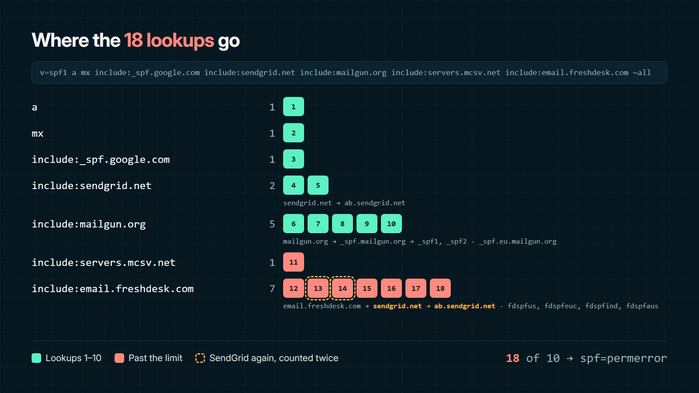
That is a 1, mx 1, Google 1, SendGrid 2, Mailgun 5, Mailchimp 1 and Freshdesk 7: 18 lookups, eight over the limit. SendGrid is in there twice, once directly and once inside Freshdesk’s include, and both count.
1. Remove what no longer sends (18 → 13)
In this example, Mailgun was used for a trial and nothing sends through it now. Its include costs five lookups. Before you remove an include, check that nothing still uses it: your DMARC reports list every server that sent mail as your domain, and an include that authorised nothing for 30 days is a candidate to go.
2. Remove includes your domain doesn’t need (13 → 10)
SPF checks the domain in the envelope sender (the Return-Path), not the From address people see. Many sending services put their own domain there, so their include on your record does nothing.
- Mailchimp sends with its own envelope sender. SPF checks Mailchimp’s domains, never yours. Mailchimp’s domain authentication today is two DKIM records and a DMARC record, and DKIM is what makes its mail pass DMARC for your domain (servers.mcsv.net, Mailchimp setup). Remove: one lookup.
- SendGrid, once you authenticate your domain in it, sends with a return-path on a subdomain it creates, such as
em1234.example.com, and SPF is checked there. The include on your root record only matters in the rare set-up where SendGrid keeps your own address as the return-path (sendgrid.net, SendGrid setup). Remove: two lookups.
Ten is allowed, since the limit is broken at eleven, but it leaves no room for the next service someone signs up for.
3. Drop a and mx unless those servers send (10 → 8)
a authorizes your website’s server. mx authorizes the servers that receive your mail. With Google Workspace, Google’s outgoing servers are already covered by _spf.google.com. If the website does send mail, a contact form for example, replace a with that server’s address as ip4:. That costs nothing, but you will have to update it if the site moves host (ip4, ip6, a, mx, ptr and exists).
4. Use your region’s include, not the global one (8 → 2)
Freshdesk’s email.freshdesk.com covers every data center it runs: SendGrid and four regional records, seven lookups in all. Freshdesk’s own help says the global include uses too many lookups, and points to the one for your data center. For a US account that is fdspfus.freshemail.io, at one lookup. Freshdesk also says SPF is not required once its DKIM records are set up (email.freshdesk.com).
The record now reads:
v=spf1 include:_spf.google.com include:fdspfus.freshemail.io ~all
Two lookups, with eight to spare. Every service that still sends is covered, the way its own documentation says it should be.
5. If you are still over: move a sender to a subdomain
Some services really do send with your domain as the envelope sender, and if that domain is your root, their include has to be in your root record. Move them to a subdomain. In Mailgun, send from a verified subdomain such as mg.example.com, as Mailgun recommends. In Amazon SES, set a custom MAIL FROM subdomain such as bounce.example.com. The service’s include then goes in that subdomain’s own SPF record. A receiver checks only the record of the domain in the envelope sender, so the subdomain gets ten lookups of its own and your root record loses that include. DMARC still aligns, because relaxed alignment, the default under RFC 9989, accepts a subdomain of the From domain (Mailgun setup, Amazon SES setup).
Don’t set aspf=s in your DMARC record if you do this. Strict alignment needs an exact match, and the subdomain is not one. Our DMARCbis guide covers what else changed in DMARC records this year.
6. Still over: flatten, and keep it flat
Flattening replaces includes with the ip4: and ip6: ranges they resolve to, and those cost nothing. Done by hand, it works on the day you do it. After that, the services keep changing their addresses, and an include is how those changes reach you. Copy the addresses and the updates stop arriving: mail from a provider’s new servers starts failing SPF, and nothing tells you why. A long flattened record also runs into DNS size limits. RFC 7208 asks for SPF answers that fit in 512 octets, so a long list has to be split across several records, each one included and each one a lookup.
DNS Toolbox’s hosted SPF is flattening that keeps itself current. You publish one include line, include:<token>.spf.dnstoolbox.app, and we resolve every service in it down to its addresses, every hour:
- One lookup when all the addresses fit in one record. When they don’t, the record splits into parts, each a lookup, never more than nine, so at least one stays yours. Macro mode costs two lookups however many senders there are.
- Only complete answers are published. If a provider’s DNS fails to answer, the last good record stays live, and you are told if it stays stale for a day.
- You hear when a service changes its addresses, by email, with what moved.
- It reads your DMARC reports to show which parts of the record authorised mail and which did nothing, and which senders fail SPF, with a button to add or remove each one.
Terms that depend on the sending address at the moment of the check (exists: and macros) can’t be turned into a list of addresses, and stay in your own record at their own cost. Hosted SPF is on the Personal plan ($9 a month or $84 a year, one hosted domain) and up (pricing).
Check the fix
- Count again with the SPF checker: it should say ten or fewer, with no void lookups past two.
- Publish one record. Replace the old one, don’t add a second next to it. A long record can be split into several quoted strings inside one TXT record, which doesn’t change the count. The SPF generator builds it and reviews the draft before you publish.
- Watch it reach the resolvers with the propagation checker. The old record lingers for its TTL.
- Send a test message to the email test and look for
spf=pass. - Keep watching. The record broke because services were added over time, and they will be again. A free account checks your domain’s SPF, DKIM and DMARC every day and emails you when a record changes or a sender starts failing.
Checked on 2 October 2026 against these official sources:
- RFC 7208, Sender Policy Framework (SPF) for Authorizing Use of Domains in Email, Version 1: §2.6.7 (permerror), §3.3 (multiple strings), §3.4 (record size), §4.5 (selecting records), §4.6.2 (mechanisms, left to right), §4.6.4 (DNS lookup limits), §5.5 (ptr)
- RFC 9989, Domain-Based Message Authentication, Reporting, and Conformance (DMARC): the
aspftag and relaxed alignment - Gmail Help, Email sender guidelines
- Mailchimp, Set Up Email Domain Authentication
- Twilio SendGrid, Configure domain authentication and How to Use Custom Return Path
- Freshdesk, Create an SPF record to ensure proper support email delivery