
Topic
Web Browsers
Chrome, Edge and Firefox how-tos: private browsing, homepages, tabs, settings and offline installers.
16 guidesUpdated 11 Nov 2026 Written and tested by Usman Khurshid
Start here
The guides people read most Web Browsers · Updated 11 Nov 2026How To Enable, Disable In-Private Browsing In All Browsers
 Web Browsers · Updated 11 Nov 2026How To Exit Incognito Mode In Any Browser (Chrome, Edge, Firefox, Vivaldi, Opera)
 Web Browsers · Updated 11 Nov 2026How To Prevent Browser Tabs From Sleeping (Disable Tab Throttling)
 Web Browsers · Updated 11 Nov 2026How To Set The Homepage And Startup Pages In Google Chrome (Windows, Mac, Android, iOS)
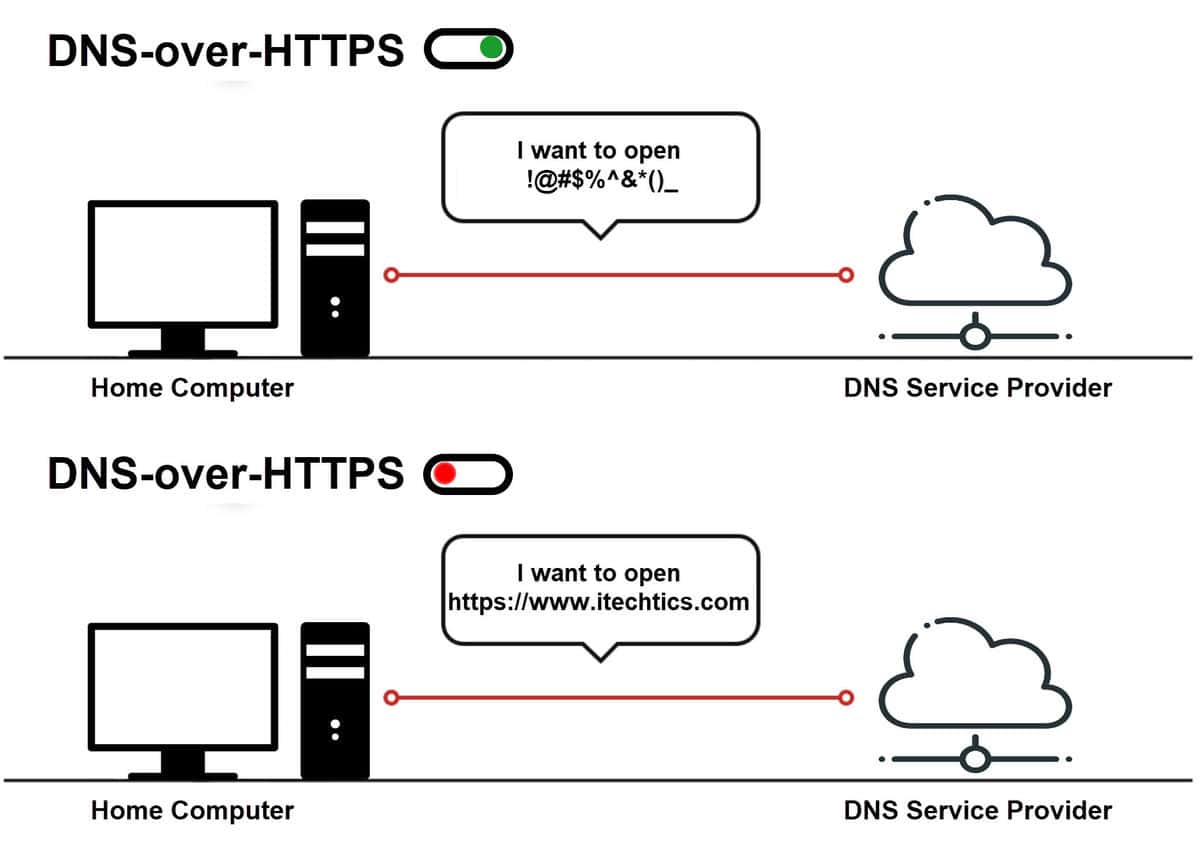 Web Browsers · Updated 31 Aug 2022What Is DNS-Over-HTTPS And How To Enable It On Your Device (Or Browser)
 Web Browsers · Updated 11 Nov 2026How To Watch Age Restricted YouTube Videos Without Logging In [Computer, Android, IPhone]
Popular this week
- 1How to Enable and Use IE/Compatibility Mode on Microsoft Edge3 views this week
- 2How To Disable Security Certificate Not Trusted In Your Browser3 views this week
- 3How To Open A Browser In Safe Mode2 views this week
- 4How to Bypass CAPTCHA And reCAPTCHA On The Web2 views this week
- 5How To Clear, Delete Browsing History In Any Browser1 views this week
- 6How To Enable Click-To-Call Feature In Google Chrome1 views this week
Support dates
All EOL dates →When these versions stop getting security updates. Checked against the vendor every week.
All 16 Web Browsers guides
Newest first How To Prevent Browser Tabs From Sleeping (Disable Tab Throttling)Are your tabs reloading every time you open them? Disable tab throttling with these methods and fix it.Web Browsers · Updated 11 Nov 2026
- How To Open A Browser In Safe ModeHaving issues with your browser? Troubleshoot it in safe mode.Web Browsers · Updated 26 Feb 2024
- How To Clear, Delete Browsing History In Any BrowserDo not let anyone see or track your browsing history. Make sure to delete all browsing history with these easy steps.Web Browsers · Updated 7 Feb 2024
- How To Exit Incognito Mode In Any Browser (Chrome, Edge, Firefox, Vivaldi, Opera)Incognito mode does not track online activity, but also restricts other functionality. Here is how to exit the private browsing mode.Web Browsers · Updated 11 Nov 2026
- How To Enable Click-To-Call Feature In Google ChromeThe "Click-to-Call" feature is going to be disabled by default. However, Google will be adding a Chrome flag to enable it when…Web Browsers · Updated 11 Nov 2026
- How To Watch Age Restricted YouTube Videos Without Logging In [Computer, Android, IPhone]Although age restrictions are there to make the web safe for children, you can easily watch age restricted YouTube videos without logging…Web Browsers · Updated 11 Nov 2026
- How To Open PDF Files In Your Preferred Browser (Chrome, Edge, Firefox, Opera, Vivaldi)You can configure each web browser individually whether to open or download PDF files. Moreover, you can also choose whether to open…Web Browsers · Updated 11 Nov 2026
- How To Set The Homepage And Startup Pages In Google Chrome (Windows, Mac, Android, iOS)To set your homepage in Chrome, go to Settings >> Appearance >> Show home button >> Enter custom web address. To set…Web Browsers · Updated 11 Nov 2026
- Microsoft Edge Reintroduces Built-In RSS Feed: Followable WebReally Simple Syndication (RSS) feeds provide the latest content published by a website/domain so that you are always on top of things.…Web Browsers · Updated 30 Aug 2022
- How to Enable and Use IE/Compatibility Mode on Microsoft EdgeMicrosoft announced it would retire its Internet Explorer (IE) web browser on June 15, 2022. So what will happen to the many…Web Browsers · Updated 30 Aug 2022
- How to Bypass CAPTCHA And reCAPTCHA On The WebAlthough CAPTCHAs are good for security, many users find CAPTCHAs to be annoying. Time is wasted on them, and you may not…Web Browsers · Updated 30 Aug 2022
- Google Chrome Command Line SwitchesChrome supports a variety of command line switches that can be used to start Chrome in a specific manner or even extend…Web Browsers · Updated 30 Aug 2022
 What Is DNS-Over-HTTPS And How To Enable It On Your Device (Or Browser)DNS-over-HTTPS (Secure DNS) is a new technology that aims to make web browsing secure by encrypting the communication between the client computer…Web Browsers · Updated 31 Aug 2022
 How To Auto-Hide Address Bar In Microsoft Edge Full Screen ModeMicrosoft is building a real competitor to Google Chrome. While Microsoft Edge has already been released, it is in active development. Microsoft…Web Browsers · Updated 31 Aug 2022
- How To Enable, Disable In-Private Browsing In All BrowsersPrivate or Incognito browsing prevents websites from tracking you and saves no history or cookies on your PC. You can also disable…Web Browsers · Updated 11 Nov 2026
- How To Disable Security Certificate Not Trusted In Your BrowserSSL certificate errors occur when a web browser cannot verify the SSL certificate installed on a website. The browser displays an error…Web Browsers · Updated 21 Nov 2024




Newsletter
Stay in the loop
New and updated guides, and Microsoft support dates that are about to end.
No spam. Unsubscribe with one click.
Need this done for your business? I help small and mid-size companies with Microsoft 365, Windows devices and email →